Performance Aware C Computing
Why C, C++, Python ?
Programming occurs at several abstraction levels from the hardware
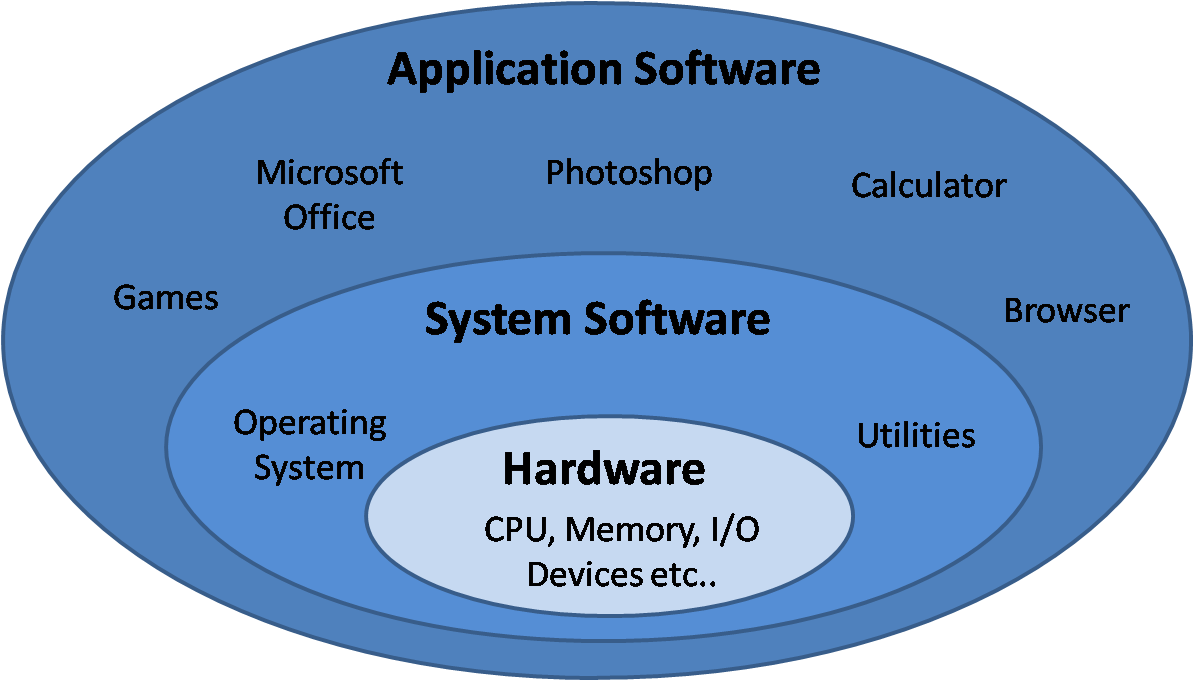
Why C, C++, Python ?
- Layers close to metal are harder to program...
- But they offer maximum control and performance
- High-level abstraction maximize productivity...
- But have significant overhead, less control over performance
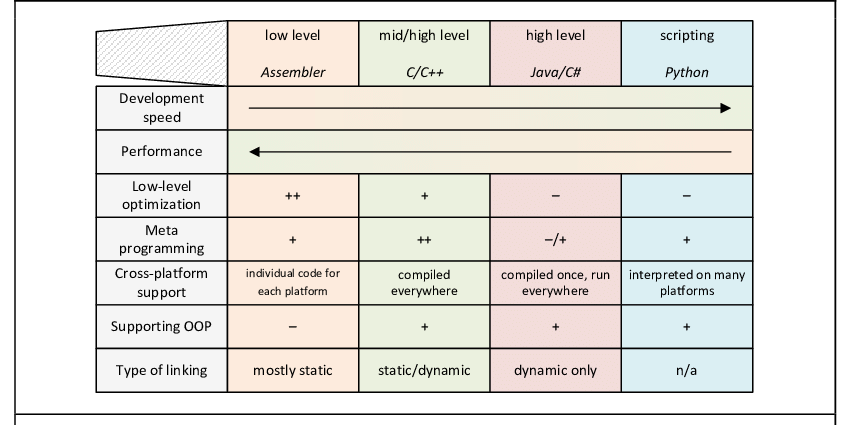
In practice; we often combine multiple languages
- C for performance critical sections, python for higher level APIs
Why C, C++, Python ?
C Programming - Operations and Typing
C is a strongly typed imperative language:
int main() {
  int a = 5;
  int b = 10;

  int c = a + b;
  float d = c / a;
  float e = (float) a / c;

  int f = a * a * a * a;

  return 0;
}
main is the program entry point.
C Programming - Functions
#include <stdio.h> // For printf(...)

int sum_and_square(int a, int n) {
  int tmp = a + n;
  return tmp * tmp;
}

int main() {
  int a = 5;
  int b = 4;
  int c = sum_and_square(a, b);
  int d = sum_and_square(3, 9);

  // Print the result to the console
  printf("(5+4)^2: %d\n", c);
  printf("(3+9)^2: %d\n", d);
  return 0;
}
C Programming - The While loop
Loops are used to repeat the same operation multiple times:
double pow(double number, size_t n) {
  double res = 1;
  while (n != 0) {
    res *= number;
    n -= 1;
  }
  return res;
}
C Programming - The For loop
C Implementation of \(\sum_{i=1}^{100}{i}\)
#include <stdio.h> // For printf(...)

int sum_range(const int start, const int end) {
  int sum = 0;
  // Consider start = 0; end = 100
  // For i starting at 0; while i <= 100; increment i by one
  for (int i = start; i <= end; i = i + 1) {
    sum += i;
  }
  return sum;
}

int main() {
  printf("Result: %d\n", sum_range(0, 100));
  return 0;
}
const qualified variable cannot be modified. This may enable optimizations during compilation.
C Programming - Conditions
Call a function and print conditionally:
void compute_all(size_t start, size_t end) {
  for (size_t i = start; i < end; i++) {
    double result = f(i);
    if (result < 0) {
      // Print the results with 3 decimals
      printf("Result of f(%d) is negative: %.3f\n", i, result);
    } else if (result > 0) {
      printf("Result of f(%d) is positive: %.3f\n", i, result);
    } else {
      printf("Resulat f(%d) == 0 !", i);
    }
  }
}
C Programming - Basic Pointers
c contains the address of a; so *c = *c + b write in a the sum of a and b.
| Adress | Value | Variable |
|---|---|---|
| 0x004 | 0 | a |
| 0x008 | 5 | b |
| 0x00c | 0x004 | c |
| ... | ... | ... |
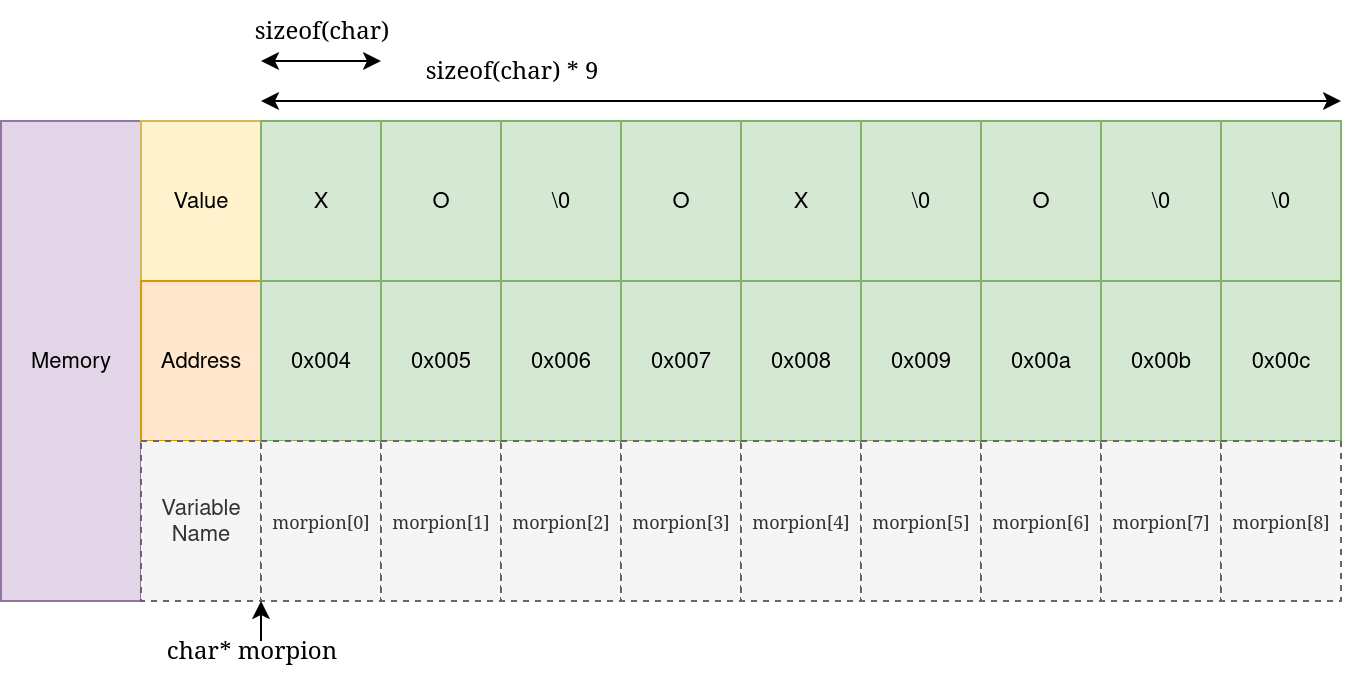
C Programming - Arrays
int main() {
  char morpion[9] = {'X', 'O',  '\0',
                     'O', 'X',  '\0',
                     'O', '\0', '\0'};
  morpion[8] = 'X'; // The player clicked on the bottom-right cell !
}
C Programming - Exercise 2
Explain the following program:
int fill_array(int *array, size_t n) {
  char buffer[256];
  int index = 0;
  while (index != n) {
    printf("Enter a number, or 'exit' to stop:\n  ");
    fgets(buffer, sizeof(buffer), stdin);
    if (strcmp(buffer, "exit\n") == 0) {
      break;
    }
    int number = atoi(buffer);
    array[index++] = number;
  }
  return index;
}
...
int array[100];
int filled = fill_array(array, 100);
for (int i = 0; i < filled; i++) {
  printf("array[%d] = %d\n", i, array[i]);
}
C Programming - Structures
Structures are user-defined composite types:
typedef struct {
  char* first_name;
  char* last_name;
  int age;
  float mean_grade;
  char gender;
} Student;
Student e1 = (Student){"Pierre", "Dupont", 22, 13, 'm'};
Student e2 = (Student){"Major", "Major", 22, 13.5, 'o'};
Student e3 = (Student){"Evelynne", "Martin", 24, 14, 'f'};

if (e1.mean_grade > 10) {
  printf("%s %s is a pretty good student !\n",
         e1.first_name, e1.last_name);
}
C has no concept of class, object, or method !
C programming - Structures 2
void display_student(Student* s) {
  // s->age is equivalent to (*s).age
  printf("%s %s (%i): %f\n", s->first_name,
                             s->last_name, s->age,
                             s->mean_grade);
}

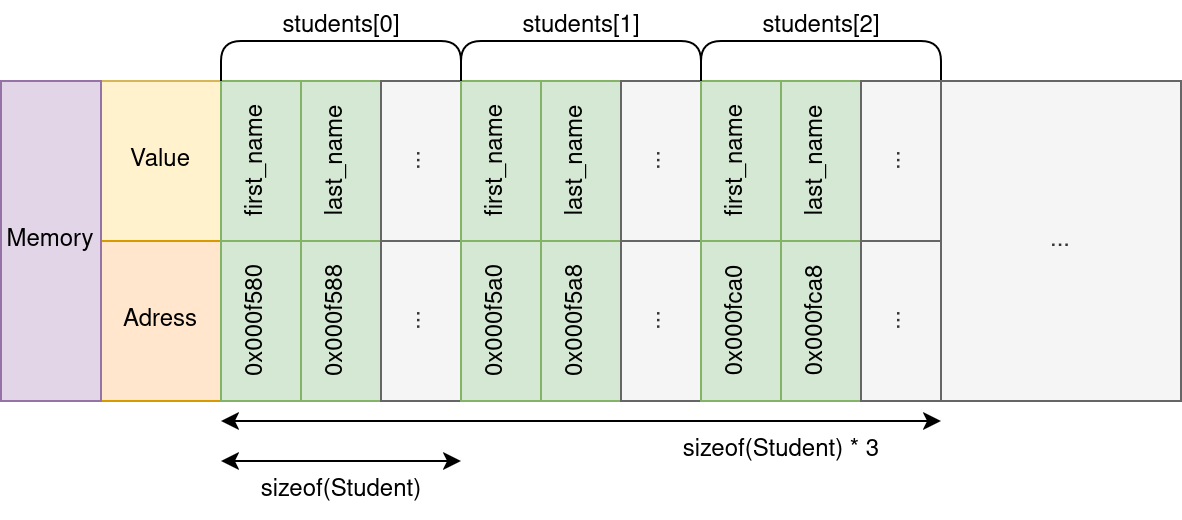
// We can have arrays of any types !
Student students[3] = {{"Dupont", "Pierre", 22, 13, 'm'}, ...};
for (int i = 0; i < 3; i++)
  display_student(&students[i]);
C Programming - Trading Abstraction for performance
In C, we must manually take care of very low level concepts
- We care about data layout, memory addresses, pointers, etc.
- The language doesn't provide linked lists, dynamic arrays, dictionaries, etc.
- Very few generic algorithms
On the flip side, we can
- Manually lay out data to maximize efficiency
- Remove any abstractions and overhead to maximize performance
- Generate code that runs as close to the metal as possible
- Optimize our program for the hardware
C Programming - Trading Abstraction for performance (Example)
Consider the following python and C code:
// C
unsigned long long tmp = 0;
for (unsigned int i = 0; i < ub; i++){
    tmp += i;
}
printf("Sum of first %llu integers is: %llu\n", ub, tmp);
Where ub is a very large number (100 Millions in this example). Which one is faster, and by how much ?
C Programming - Trading Abstraction for performance (Example)
Results:
Cversion: 0.024sPythonversion: 5.650s
That's a speedup of \(\times 235\).
We will see later in this course how this is possible.
Numpy and other libraries
Note that we could use numpy or the sum python function: but those are actually implemented in C !
Managing Memory
Managing Memory - Concept
In High-level languages
- We operate on abstracted data structures (lists, dictionaries, etc.)
- Memory is managed automatically (allocation, resizing, deallocation)
- We don't care about memory alignment, stack vs. heap, page size, NUMA effects, etc.
In C
- We perform directly with primitive data and raw memory
- We are responsible for allocation, layout, and cleanup
- We can only request chunks of raw memory, and fill it however we choose
- This is critical for performance
This low level control is critical for performance; hence we must understand how memory works under the hood !
Managing Memory - Memory Types
We can distinguish two types of memory
- Memory automatically allocated by the compiler on the stack.
- Stores variables, functions arguments, etc.
- Fast but limited in size
- Memory that is (manually) dynamically allocated on the heap
- Must be allocated and freed by the developer !
The kernel (Linux / Windows) allocates memory pages and operates at a coarse grain level.
The standard library (libc) manipulates pages on a finer scale and provides memory to the user.
Managing Memory - Allocation
We mainly use two functions:
malloc(n)
malloc allocates n bytes and returns a pointer to the beggining of the allocated memory.
If we want to store 400 int, we need to compute the required size in bytes!
int* array = malloc(sizeof(int) * 400)
Variants exists like calloc, realloc or aligned_alloc.
free(ptr)
free deallocates the memory pointer to by ptr
Managing Memory - Allocation
#include <time.h> // for time
#include <stdlib.h> // For malloc,  srand, rand

int do_the_thing(int n) {
  // We allocate n numbers
  float* numbers = malloc(sizeof(float) * n);

  // We seed the random number generator
  srand(time(NULL));

  // We generate nsamples random numbers
  for (int i = 0; i < n; i++) {
    numbers[i] = (float) rand() / RAND_MAX; // Generate a number in [0, 1]
  }
  ... // Do something complicated here
  free(numbers); // Release memory back to the allocator / Kernel
  return 0;
}
Managing Memory - Allocation
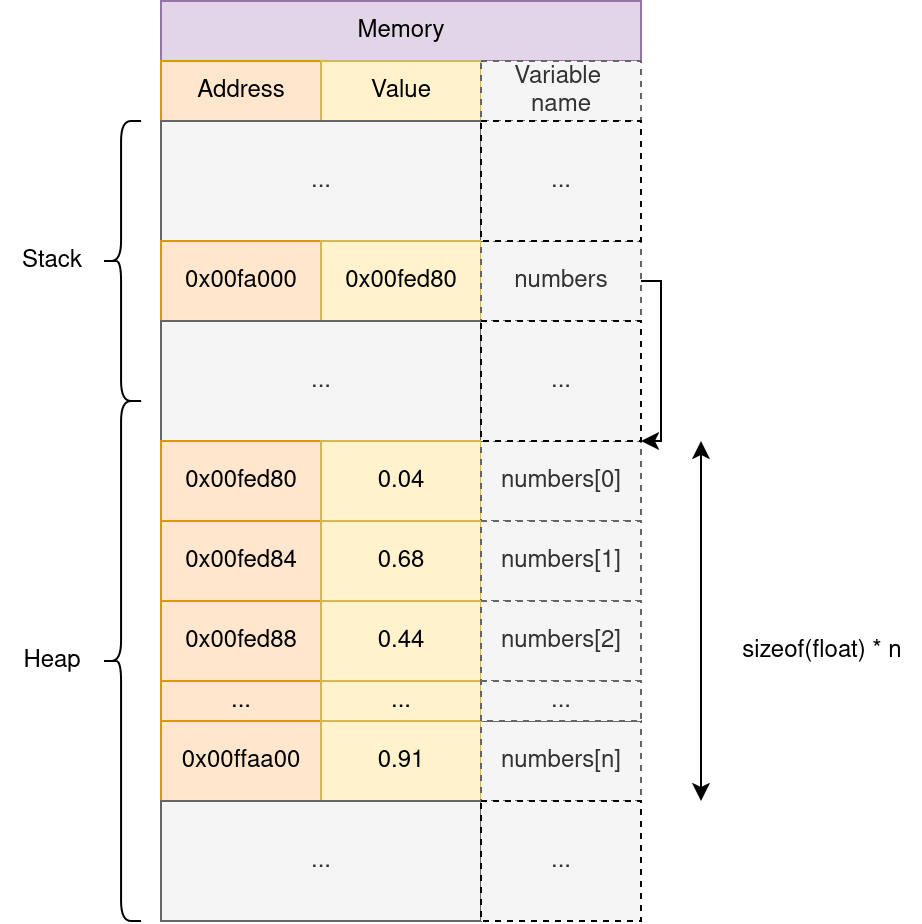
malloc returns a pointer to the beginning of the allocated memory block
Managing Memory - Exercise (NBody2D)
Consider the following data structures:
typedef struct {
  double x, y;
  double vx, vy;
  double ax, ay;
} Particle2D;

typedef struct {
  Particle2D* p;
  size_t n;
} NBody2D;
How do we allocate an NBody2D of size n ?
Managing Memory - Exercise (NBody2D)
NBody2D* nbody2d_alloc(size_t n) {
  NBody2D* res = malloc(sizeof(NBody2D));
  res->n = n;
  res->p = malloc(sizeof(Particle2D) * n);
  return res;
}
Note that we only allocate memory here: the particles positions/velocities/accelerations aren't initialized !
It's safer to use sizeof(Particle2D) than to manually compute the size of the structure.
Managing Memory - Exercise (NBody2D)
NBody2D* nbody2d_alloc(size_t n) {
  Particle2D* tmp = malloc(sizeof(Particle2D) * n);

  NBody2D res = (NBody2D){tmp, n};

  return &res;
}
Managing Memory - Exercise (NBody2D)
NBody2D* nbody2d_alloc(size_t n) {
  NBody2D* res = malloc(sizeof(NBody2D));

  if (res == NULL) {
    perror("Allocation failed");
    exit(1);
  }

  res->n = n;
  res->p = malloc(sizeof(Particle2D) * n);
  if (!res->p){
    perror("Allocation failed");
    exit(1);
  }
  return res;
}
NULL is a reserved value (typically 0) to represent an invalid address. malloc returns NULL on failure (out of memory, etc.).
Managing Memory - Deallocation
Memory is not infinite !
In Python (and Java, C#, etc.); memory is managed by the garbage collector (GC):
- The runtime tracks all memory allocations; and all reference(s)
- When a memory block is not referenced by the program; the GC will release the memory back to the kernel.
In C/C++, the user must deallocate memory using free(ptr).
Memory leak
If memory is not freed (memory leak) the computer can run out:
- The kernel can kill the program
- The system can crash
- Other applications requesting memory can crash or fail
Managing Memory - Exercise (sizeof)
What will the following program print:
void f(size_t n) {
  double* data = malloc(sizeof(double) * n);

  printf("Allocated array of size=%d\n", sizeof(data));

  double buffer[256] = {0};
  printf("Allocated buffer of size=%d\n", sizeof(buffer));
  ...
}
We consider that sizeof(double) = 8.
Virtual And Physical Memory - Problem
- How can the kernel guarantee that memory is always contiguous?
- Can I access memory from another program and steal their data?
- How can multiple applications share the same memory?
- Some variables have hard-coded addresses!
- How to handle memory fragmentation ?
Virtual And Physical Memory - Concept
We separate Physical Addresses (locations in memory) from Virtual Addresses (Logic locations) seen by each program !
- Each program is given its own isolated virtual address space.
- The CPU includes a Memory Management Unit (MMU) that translates virtual addresses into physical addresses.
- For example, the program accesses the virtual address
0x004, which the MMU translates to a physical address like0xfde58652. - Physical memory is divided into fixed-size blocks called pages (typically 4 KB).”
- If a program requests 4 GB of memory, it will occupy approximately 1,048,576 pages (4 GB / 4 KB per page).
The Illusion of contiguity
Each process believes it has acces to a large, contiguous block of memory; while it can be physically fragmented or shared.
Virtual And Physical Memory - Diagram
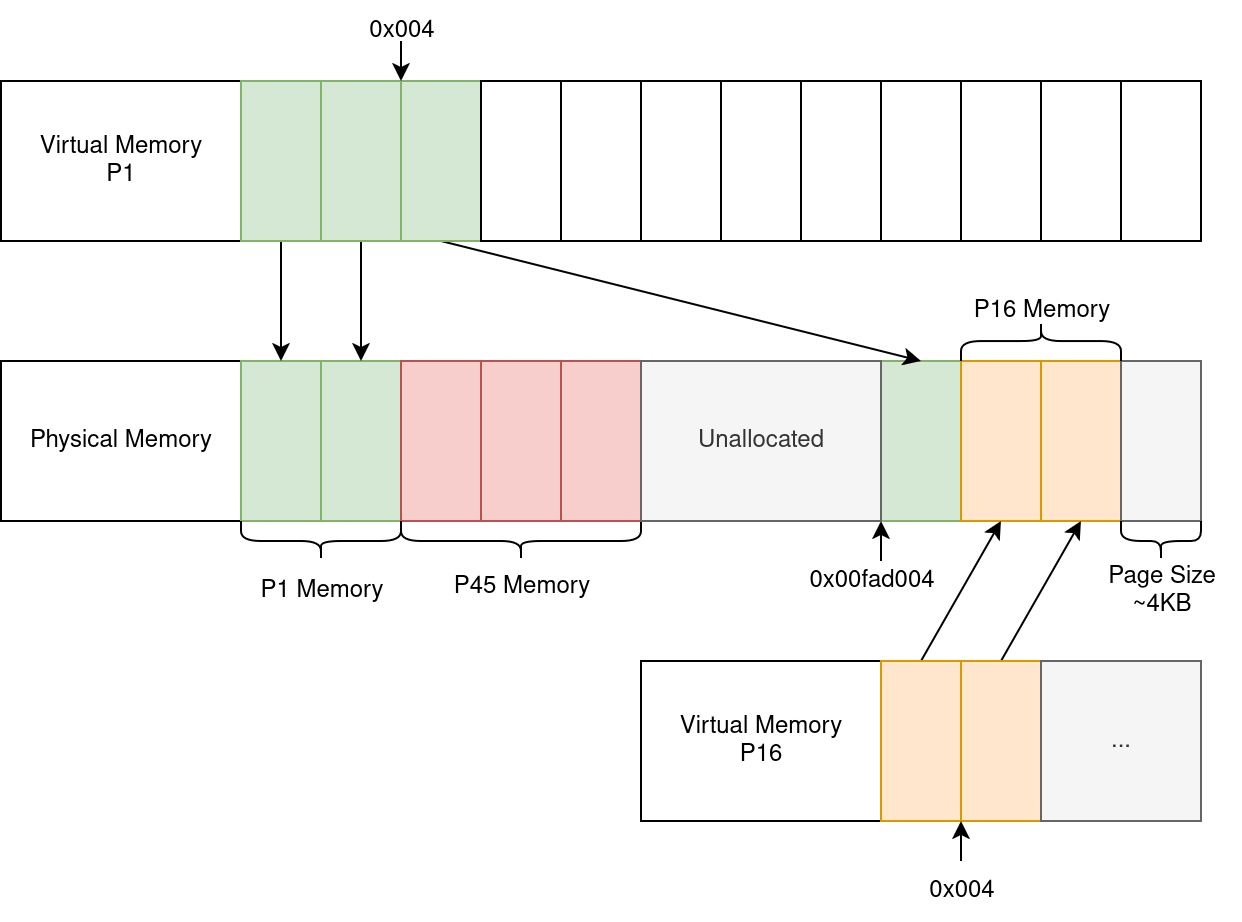
*Note that this is a simplified representation.
Memory Hierarchy
Which memory are we talking about ?
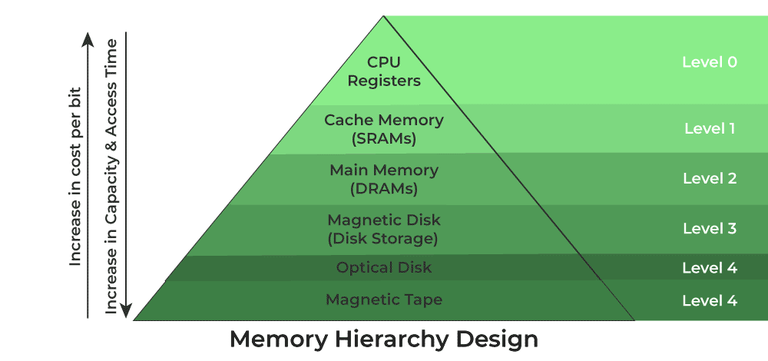
Note that GPU(s) also have their own separate memory !
Memory Hierarchy
RAM behaves as the main memory:
- When doing computations on the CPU (or GPU), we copy the data from RAM to caches/registers.
- Results are then stored temporarily in cache.
- Finally, the data is written back to RAM.
When modifying a file, the file is loaded from the disk to RAM and back.
Memory Hierarchy
- CPU computations are extremely fast, and memory access can be a bottleneck
- Registers have the lowest latency
- CPU caches (L1, L2, L3) act as fast buffers for memory
- DRAM (main memory) is much slower, but cheaper and larger
- Accessing DRAM causes significant delays compared to cache
To achieve high performance, we must maximize data reuse in registers or caches, and minimize DRAM access.
CPU Caches
Most CPU have 3 levels of cache
- L1d - First Level Cache (Very fast)
- L2 - Second Level Cache (Fast)
- L3 (Last Level Cache - LLC) (Larger but slower than L1/L2)
Some cache level are per-core (L1, often L2) whereas others are shared between multiple cores (L3).
Instruction Cache
The assembly instructions are stored in a separate (L1i) instruction cache
CPU Caches
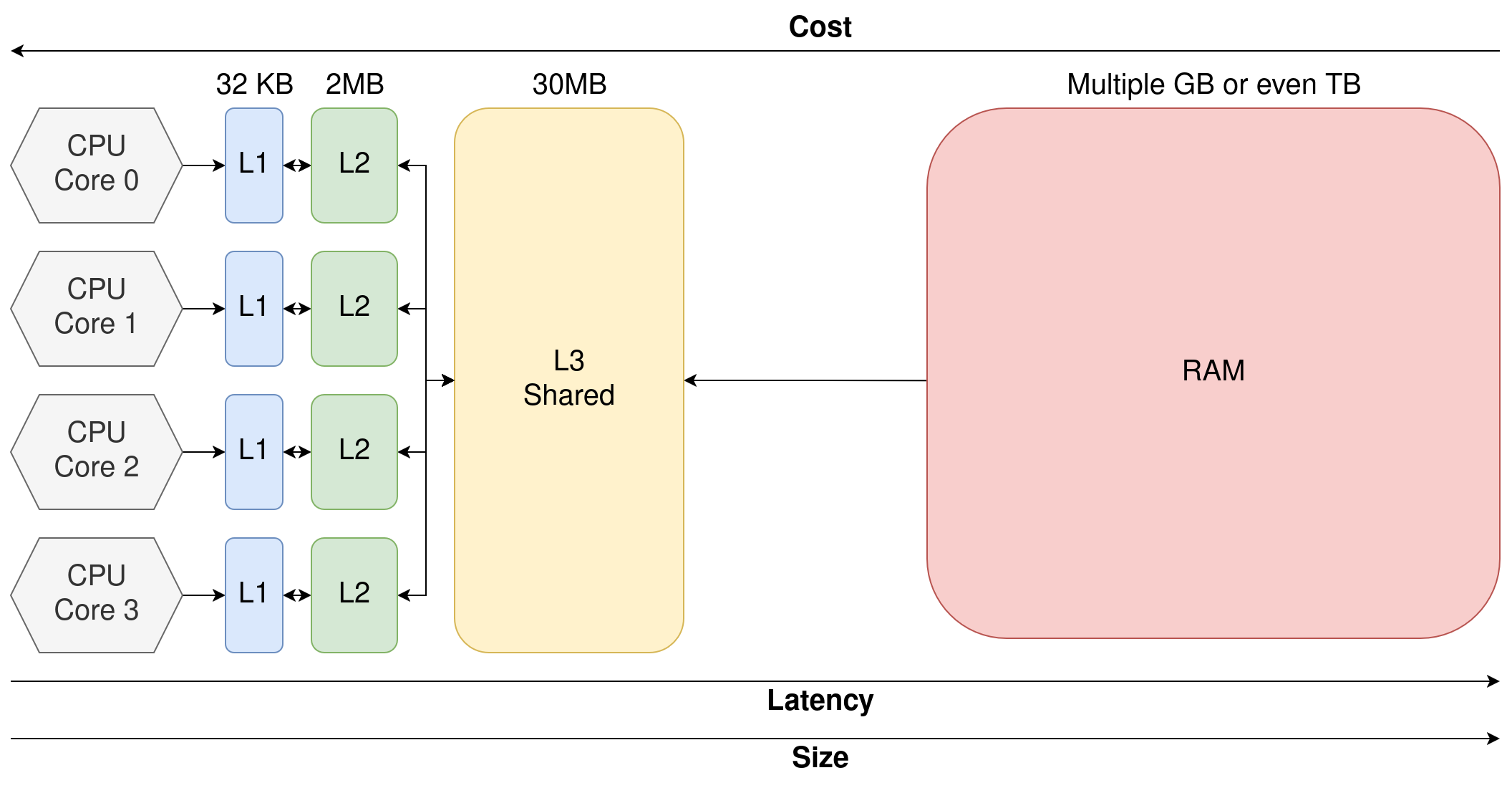
We speak of Heterogeneous Memory Hierarchy: the same memory accesses can have different latency depending on where the data resides !
[Live example: LSTOPO]
CPU Caches - In practice
- The cache controller looks-up the data inside the CPU cache (L1 -> L2 -> L3)
- If available, data is sent to register for the ALU
- Else, a memory request is emitted
- This introduces latency and a bubble in the CPU pipeline
- When the memory request is resolved; execution resumes
- The results of \(a*b\) is written to cache, and eventually back to main memory later on.
CPU Caches - In practice
In practice:
- The CPU fetches entire cache line (Often 64 Bytes) at once (If float: \(64B / 4B = 16\) values at once)
- The CPU can prefetch data: it learns data access patterns and anticipates future memory access.
- The CPU can execute out-of-order; independent instructions are executed while the memory request is in flight.
CPU Caches - In practice
A few rough figures:
- An L1 Load takes ~1ns
- An L2 Load takes ~3-5 ns
- An L3 Load takes ~10-40 ns
- A DRAM Load takes ~100 ns
- An SSD Read takes ~10-100 \(\mu\)s
- An HHD Read takes ~5-10 ms
Note that the exact timings will vary depending on the system
Caches CPU - Strided Access
Consider two NBody 3D implementations:
Array Of Structure (AoS)
float* alloc_aos(size_t N) {
  // We allocate N tuples of (x, y, z) positions
  float* positions = malloc(sizeof(float) * N * 3);
}
Structure Of Array (SoA)
float** alloc_soa(size_t N) {
  // We allocate separate arrays for each components
  float* x = malloc(sizeof(float) * N);
  float* y = malloc(sizeof(float) * N);
  float* z = malloc(sizeof(float) * N);

  float** res = malloc(sizeof(float*) * 3)
  res[0] = x;
  res[1] = y;
  res[2] = z;
  return res;
}
Caches CPU - Strided Access
We want to record the number of particles with \(x \leq 0.5\)
Array Of Structure (AoS)
Structure Of Array (SoA)
Which one is faster; and why ?
Which access pattern makes better use of cache lines ?
Caches CPU - Strided Access
Perf results summed across 100 runs:
| Time | # Instr | # L1 Loads | # L1 Miss | # LLC Loads | # LLC Miss | |
|---|---|---|---|---|---|---|
| AoS | ~1.93s | ~14 Billion | ~3.5 Billion | ~1 Million | ~400k | ~382k |
| SoA | ~1.75s | ~14 Billion | ~3.5 Billion | ~300k | ~24k | ~15k |
| # Cache references (LLC) | # Cache miss | |
|---|---|---|
| AoS | ~158 Million | ~151 Million |
| SoA | ~52 Million | ~35 Million |
With AoS more load fail in the L1, leading to LLC accesses.
Most LLC loads still results in misses, leading to DRAM access.
Compilation & Assembly
Compilation & Assembly - Introduction
C is a compiled language: we must translate the source code to binary for the CPU
gcc -o main (<flags>) ./main.c
- Python is interpreted
- More flexible but significantly slower
- C# and Java are compiled to intermediary bytecode and then executed via a virtual machine (or JIT-ed)
- Balances performance and productivity
- C/C++/Rust are compiled to binary
- Poor portability, but no intermediary.
Compilation & Assembly - Simple Loop
main:
.LFB6:
    pushq   %rbp                 // We record the frame pointer
    movq    %rsp, %rbp
    movl    $0, -4(%rbp)         // Initialize sum
    movl    $0, -8(%rbp)         // Initialize i
    jmp .L2
.L3:
    movl    -8(%rbp), %eax       // Load i to a register
    addl    %eax, -4(%rbp)       // Add i and sum (from memory)
    addl    $1, -8(%rbp)         // Add 1 to i (from memory)
.L2:
    cmpl    $99999, -8(%rbp)     // Check if i < 100 000
    jle .L3                    // Jump Less Equal
    movl    $0, %eax             // Set the return value of main
    popq    %rbp
    ret                        // Return from main
gcc ./main.c -o main -O0
Compilation & Assembly
Assembly is as close to the metal we usually get, and is architecture dependant:
- Intel and AMD use the x86 Instruction Set
- x86 has multiple extensions (FMA, sse, avx, avx512, etc.)
- To maximize performance, we should compile our applications on each platform
- Our binaries are not portable
- But we can use dedicated instructions
- Other instructions set exists (ARM, Risc V, etc.)
Compilation & Assembly - Optimization passes
The compiler is not just a translator:
- The compiler can generate optimized instructions from our program
- Constant values can be propagated, unused values/code removed
- Operations can be reordered, inlined, vectorized using SIMD, etc.
- Many, many more optimizations
Those optimizations are enable through flags such as -O1, -O2, -O3 which are predefined sets of optimization passes.
The flag -march=native allows the compiler to target the current machine for compilation and use all the available ASM extensions.
Compilation & Assembly - Compiler Pipeline
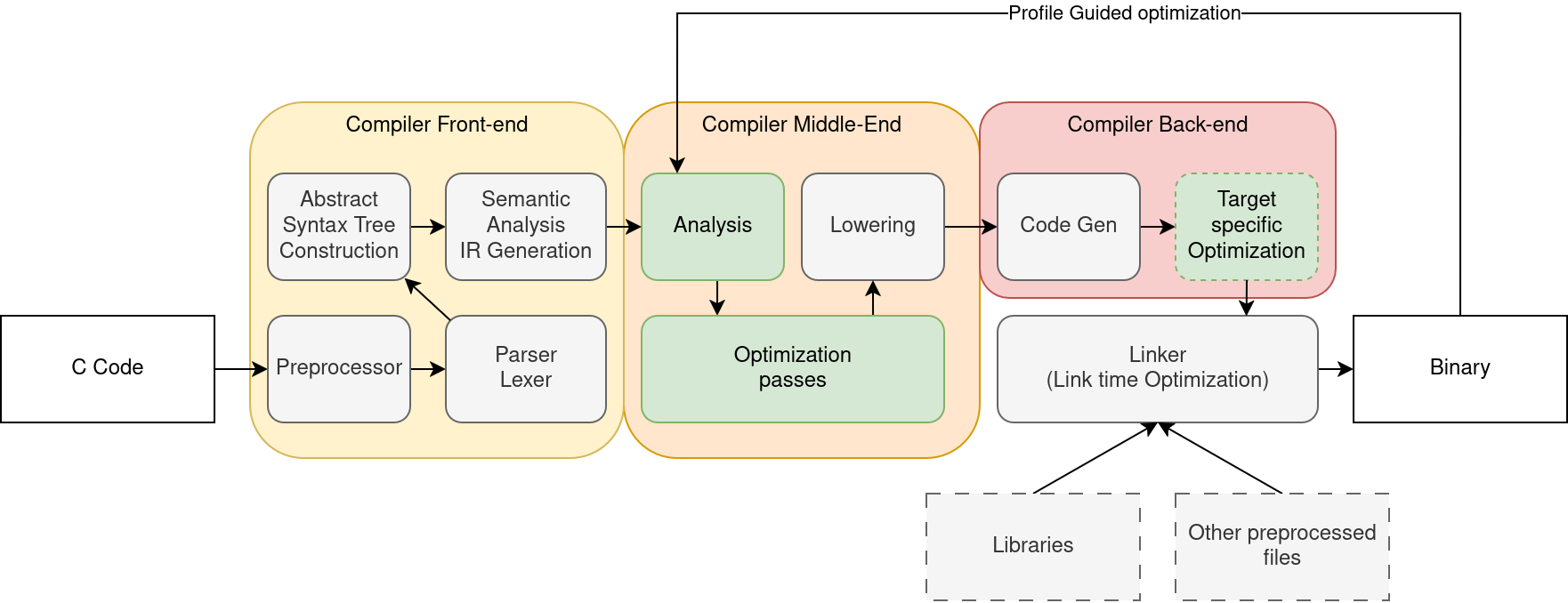
There are several compilers with varying performance and features:
- GCC and Clang-LLVM (The classics)
- MSVC (Microsoft), mingw-LLVM, arm-clang (For ARM) and many, many others.
Makefile Basics - Motivation
What if we need to compile a project with thousands of files ?
- Very easy to break
- If we modify one file (
main.c) we must recompile everything -> waste of time
We need something better!
Makefile Basics - Introduction
Make is a scripting tool to automate compilation. It works by defining rules inside Makefiles.
mainis the target (What we want to build)main.c my_library.c my_library.hare the dependencies: rule reruns if any of these changes$(CC) -o $@ $^ $(CFLAGS)is the recipe (what is executed when the rule is run)$@expands to the target name$^expands to all dependency
Makefile Basics - Introduction
main: main.o my_library.o
  $(CC) -o $@ $(CFLAGS) $^

main.o: main.c
  $(CC) -c -o $@ $(CFLAGS) $<

my_library.o: my_library.c my_library.h
  $(CC) -c -o $@ $(CFLAGS) $<
The main rule combines the object files main.o and my_library.o into the final executable.
We use the -c flag to let gcc know we are producing object files.
Makefile Basics - Phony rules
Makefiles expects that a rule main produces a file called main. However, not all rules produce files:
Here, make all will be an alias to build everything, while make clean is a custom rule to clean all build artifacts.
make re will first run clean (delete everything) then all (build everything), which allows us to rebuild our project from scratch.
Makefile has many, many other functionalities, outside the scope of this course.
Makefile Basics - Usage
The typical projects looks something like:
make will look for a file in the cwd named Makefile or makefile.
You can directly call make all, make clean, etc.
Parallelism Basics
Parallelism Basics - Introduction
Compiler optimization is only one side of high peformance computing.
If you remember; we saw in LSTOPO that our CPU has many cores:
- Every core can perform computations independently of the other
- Multiple process (Chrome, vscode, firefox, excel) can run simultaneously on different cores.
- The kernel manages execution through thread scheduling and time-slicing
Main Thread
Every process has at least one "thread of execution", which is an ordered sequence of instructions executed by the CPU.
Parallelism Basics - Introduction
What if we could split our programs into multiple threads ?
- If we have 1 thread only one computation happens at a time
- If we have 2 threads, we can potentially double throughput !
In practice, there is some overhead, we must handle dependencies between instructions, etc.
Parallelism Basics - Types of parallelism
We consider three main types of parallelism
- Single Instruction Multiple Data (SIMD): also called Vectorization
- single instruction operates simultaneously on multiple data elements.
- Shared Memory: Multiple threads inside the same memory space
- Threads share a memory space, enabling fast communication and synchronization.
- Distributed Memory: Multiple processes
- Communications are slower, but this model enables scaling across multiple machines.
For this course, we will only focus on SIMD and Shared Memory parallelism.
Parallelism Basics - Shared Memory
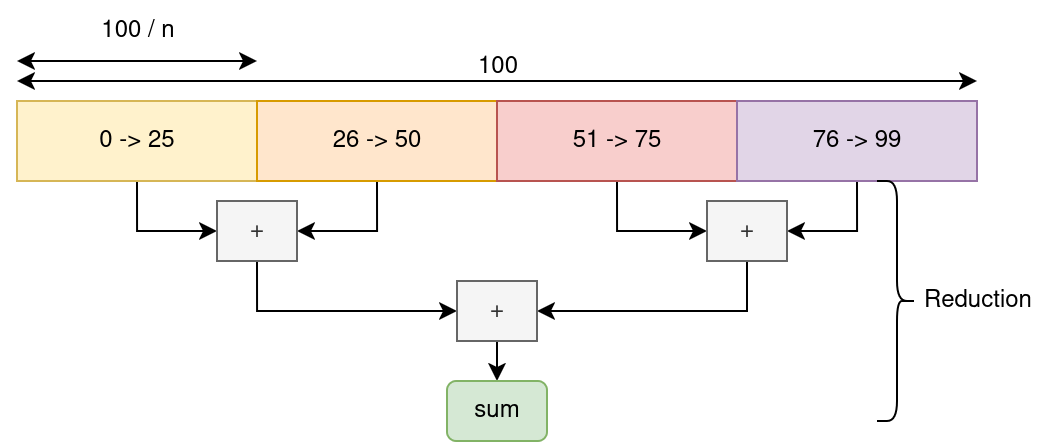
Consider the following loop:
We can slice the iteration space in multiple chunks:
Parallelism Basics - Shared Memory
We split the program into multiple instruction sequences running in parallel.
- Every thread operates a sum on a subset of the data
- We synchronize every thread and combine the partial sums via a global reduction.
OpenMP is an HPC tool designed for scenarios like this !
It's a simple to use library/compiler pass to parallelize trivial loops.
Parallelism Basics- OpenMP
gcc ./main.c -fopenmp -O3 -march=native
This directive automatically distributes the loop iterations across all available CPU cores, performing a thread-safe reduction on sum.
Parallelism Basics - OpenMP details
OpenMP defines a set of directives which are operations followed by a set of modifiers.
#pragma omp: is the start of all OpenMP directivesparallel:enable the creations of multiple threadsfor: toggle the automatic slicing of following loopreduction(+:sum)toggles a reductions clause for sum using the+operation.
This code will be enough for most cases; but OpenMP allows for significantly more complex operations.
Parallelism Basics - Advanced OpenMP Example
float global_min = FLT_MAX;
int global_min_index = -1;
#pragma omp parallel
{
  float min_value = FLT_MAX;
  int min_index = -1;
#pragma omp for nowait schedule(dynamic)
  for (int i = 0; i < N; i++) {
    if (T[i] < min_value) {
      min_value = T[i];
      min_index = i;
    }
  }
#pragma omp critical
  {
    if (min_value < global_min) {
      global_min = min_value;
      global_min_index = min_index;
    }
  }
}
Naive NBody 3D Strong Scaling - Setup
We increase the number of threads while keeping the work size constant.
OMP_PLACES={0,2,4,6,8,10,12,14} OMP_PROC_BIND=True OMP_NUM_THREADS=8 ./nbody 10000
sudo cpupower frequency-set -g performance
5 Meta repetitions per run, 13th Gen Intel(R) Core(TM) i7-13850HX @5.30 GHz, 32KB/2MB/30MB:L1/L2/L3 15GB DDR5.
Naive NBody 3D Strong Scaling - Results
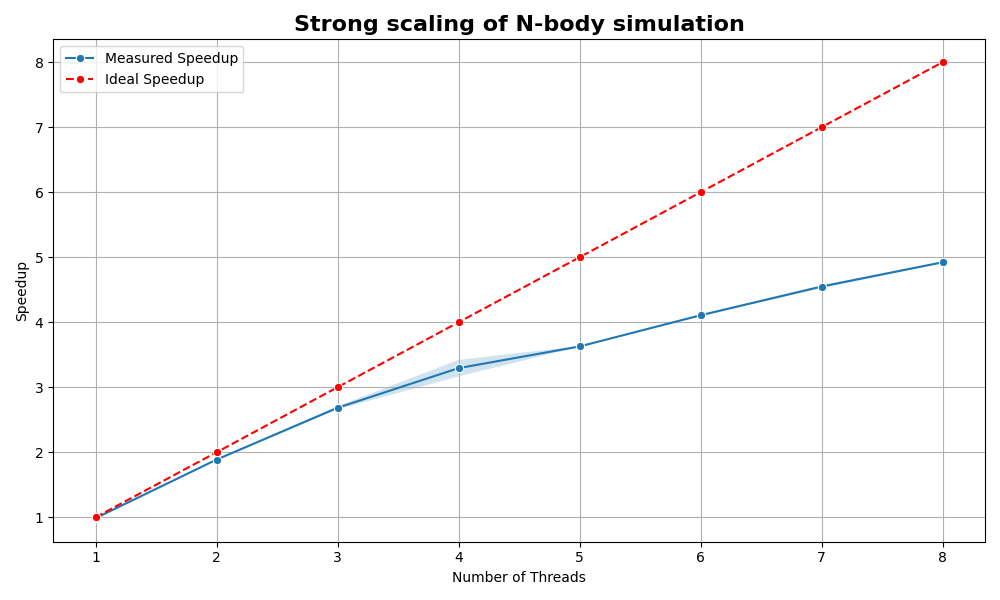
Speedup is limited by runtime overhead, concurrency, memory bandwidth, data size, etc.